
Website Maintenance

Website maintenance for Orangeville and Headwaters businesses

Website maintenance for small business sites across Orangeville and the Headwaters: updates, backups, security and seasonal edits, so your site is as accurate in February as it is in June.

  • WordPress updates
  • Off-site backups
  • Security checks
  • Seasonal edits
  • Form testing
Website health dashboard open on a laptop at dawn, a backup drive plugged in beside it

A four-season business needs four-season website maintenance

A landscaper on the edge of town sells lawn care in May and snow plowing by November. A Broadway café shortens its hours when the patio closes. Meanwhile, a Farmers’ Market vendor moves indoors from November to April. Each of those changes belongs on the website as well as the Google listing, and a site still advertising spring clean-ups in January tells visitors that nobody is minding it.

Beneath the content sits the software. A WordPress site is a core system, a theme and a handful of plugins written by different people, each updating on its own timetable. Leave them alone for a season and something eventually gives: the booking button stops responding on phones, or the contact form keeps saying “thank you” while the messages go nowhere. Often nobody notices until inquiries have dried up for weeks.

Website maintenance is the routine that stops both kinds of decay. It keeps the software current with a backup behind every change, tests the parts that bring in money, and keeps the words on the site true to how your business runs this month.

  • 4 seasons your content must keep up with
  • 2 places your hours must match: site and listing
  • 24/7 uptime checks with a human alert
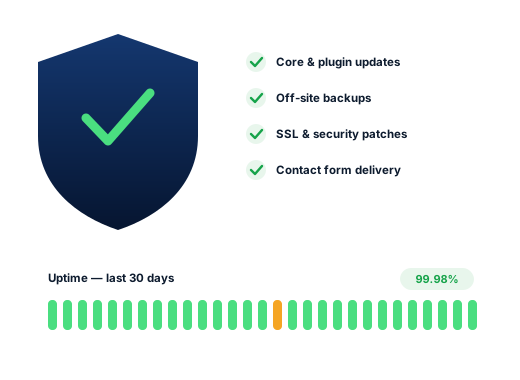
A shield symbol beside a checklist of site checks and a small uptime graph

Search demand

Website maintenance searches that start after something has gone wrong

There are no Orangeville-specific suggestions for website upkeep, so these are general Google searches. Most describe a problem that has already happened.

Search term Intent Why it matters
wordpress maintenance High Ready to hand the job to someone else rather than keep doing it.
website maintenance cost Research Budgeting for upkeep as a running cost.
wordpress contact form not working Urgent Messages are going missing while the form still says “thank you”.
wordpress critical error Urgent An update has taken the site offline.
ssl certificate expired Urgent Visitors see a browser warning instead of the site.
wordpress malware removal Urgent The site has been compromised, so every hour counts.
domain name renewal Medium A renewal notice that may be landing in an old inbox.

Each of these is cheaper to prevent with website maintenance

Read the list again: nearly every search is made after the harm is done, when the bill covers the repair and the weeks of missed inquiries. Website maintenance instead moves that cost to the front, where it is smaller and predictable. On Orangeville sites we add a seasonal content review, so hours, services and notices change when the weather does.

Quiet failures

Five problems website maintenance catches on Dufferin business sites

Each one can run for months without a single visible error.

  1. 01

    Out-of-season content

    Spring services promoted in winter, summer hours still posted in December, a closure notice left over from last year’s holidays. As a result, visitors read it as a business that may not be operating, and they move on.

  2. 02

    A contact form that stopped delivering

    The form confirms the message, but the email is filtered as spam or refused on its way to you. Routing it through a proper sending service and then testing it every month closes the gap.

  3. 03

    An update that broke something on phones

    A plugin update changes a script the theme relied on, and the menu or booking button stops working on mobile while the desktop still looks fine. Backing up first and checking key pages on a phone afterwards catches it.

  4. 04

    A site built years ago by someone who has moved on

    Common in a town where businesses last for decades. Nobody remembers the hosting login, the domain renews to a long-gone email address, and the plugins have sat untouched for years. So we start by tracking all of it down and putting it in your name.

  5. 05

    Hidden spam slipped in through an old plugin

    An outdated plugin lets someone insert pages or links that visitors never see but Google does. Rankings then slide, yet nobody can spot the cause from the front of the site.

Layers to look after

Website maintenance across four parts of a WordPress site

They update separately and fail in different ways, so each gets its own routine.

01

The WordPress core

Patched promptly

We apply security releases within days, which is what the WordPress update guide urges every site owner to do. Bigger version jumps wait a little, until the booking, form and shop plugins your site leans on have caught up.


02

Theme and plugins

Backed up, then updated

Where most breakages and most break-ins begin. Plugins you no longer use are deleted outright rather than merely switched off.

03

PHP on the server

Agreed with you

The language your host runs WordPress on goes out of date too. Older versions are slower and stop receiving security fixes, and hosts eventually upgrade them whether the site is ready or not.

04

Domain, DNS and SSL certificate

Watched

Seldom changed and painful when they lapse, since the website and your email can vanish together. So we note who holds each one, under whose account, and the renewal date.

The work

What website maintenance covers

01

Careful updates

WordPress, the theme and each plugin brought up to date on a set rhythm, with a fresh backup beforehand and the main pages checked on a phone afterwards.

02

Backups held off the server

Copies of your files and database kept away from your host, with a test restore now and then so we know the copies truly work.

03

Security hardening

Malware scans, protection on the login page, old user accounts removed, and patches applied quickly when a plugin weakness is published.

04

Uptime monitoring

A monitor requests your home page every few minutes, day and night, and alerts a person whenever it fails to load.

05

Monthly form tests

A test message sent through each form and booking tool every month, so we know it still reaches your inbox.

06

Seasonal and small edits

Winter hours, holiday closures, a new service for the season, a staff change: send it over and it goes live.

Done carefully

Who holds the keys during website maintenance

Rules we keep for every client, written down so you can hold us to them.

How we work
You own the hosting, the domain and an administrator account. We work through a separate login you can switch off whenever you like.

Nothing about website maintenance requires handing over your accounts. Our monthly plans also cover routine upkeep for a site we look after. A site that is far behind, or has been hacked, needs a one-time catch-up first, priced before we start.

Your access
Never removed
Backups
Stored away from your host
Extra work
Priced before it starts
Ask us about your business
A laptop and an open notebook on a wooden desk beside a window with autumn colour outside
  • No changing passwords on your own accounts.
  • No update without a backup taken first.
  • No surprise invoices for unapproved work.
  • No pirated “premium” plugins, a frequent route into hacked sites.

How we work

How we work, step by step

Four stages, from being overlooked to being the first name Orangeville sees.

  1. 01

    Look closely

    We check your site, your Google profile and where you rank from town and from the countryside, then list what is holding you back.

  2. 02

    Choose the searches

    We decide which searches are worth winning and match each to one page, so nothing on your site competes with itself.

  3. 03

    Do the work

    Profile, website, content and directory fixes, carried out with the most valuable changes first.

  4. 04

    Report and refine

    A short monthly summary of calls, messages and rankings, with next month’s priorities spelled out.

Questions

Website maintenance questions from Headwaters owners

What does website maintenance cost?

Routine upkeep is part of our monthly plans — Starter $300, Growth $500, Pro $700, all CAD — and none of them ties you in. If your site needs a catch-up first, that is quoted once after we have looked at it.

Does a small site really need this?

If it brings in calls or bookings, yes. However, a single-page placeholder that nobody visits can get by with an occasional check, and we will tell you if that describes yours.

Someone else built our site years ago. Can you take it on?

Usually. We begin with a review of what it runs on, who holds the domain and hosting, and what is out of date or unsafe, then agree a plan with you.

Can you change our hours and seasonal services for us?

Yes. Send the change and we make it on the site. We can also remind you ahead of winter and spring so the switch happens on time.

Our site has been hacked. What happens now?

Cleanup is a one-time job: removing the injected code, closing the gap it came through, restoring clean files and asking Google to review the site if it has been flagged.

Is hosting included?

Hosting stays in your name, and your host bills you for it directly. We can suggest a sound one and manage it alongside you.

Works best alongside

Other services for Orangeville businesses

Each service supports the others: a fast site helps rankings, rankings lower ad costs, and a complete listing lifts everything.

See all services

Further reading

From the blog

More reading on this topic for Orangeville business owners.

See where you stand in Orangeville

Request a free audit: where you rank in town and across the townships, who sits above you, and the fixes worth making first.

Get your free SEO audit